
In industrial manufacturing, temperature isn’t just a number on a screen—it’s the fine line between a flawless product and a completely ruined batch. Whether you are operating a high-speed plastic injection molding machine, an industrial baking oven, or a packaging sealer, a temperature fluctuation of just a few degrees can lead to wasted materials and severe financial losses.
This is where a PID temperature controller steps in as the absolute “brain” of your heating and cooling systems.
But what exactly is it? For many buyers and junior technicians, the acronym “PID” (Proportional-Integral-Derivative) brings back stressful memories of complex calculus from engineering school.
Relax. You don’t need an advanced math degree to keep your industrial machinery running perfectly. In this quick, 5-minute guide, we are going to strip away the heavy academic jargon. We will explain exactly how a PID controller works using plain English, why it outsmarts traditional ON/OFF switches, and most importantly, how to build a rock-solid temperature control loop for your industrial panels.
PID vs. ON/OFF Control: Why Precision Matters
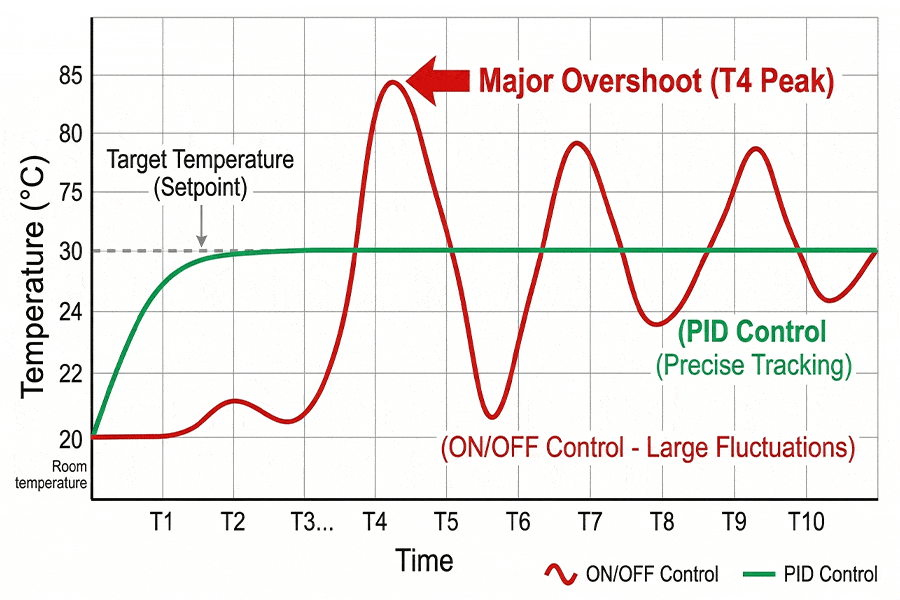
To truly understand the genius of a PID temperature controller, we first need to look at the traditional, cheaper alternative: ON/OFF control.
Imagine driving a car where the gas pedal only has two positions—100% floored or completely released. You accelerate wildly until you hit the speed limit, then take your foot completely off the gas. Your ride would be incredibly jerky, right?
That is exactly how a basic ON/OFF thermostat works. If your industrial oven’s target temperature (known as the Setpoint or SV) is 200°C, the heater turns on at full power. Once the sensor detects it has reached 200°C, the power completely shuts off.
But here is the fatal flaw in industrial manufacturing: Residual Heat.
Even after the power is cut, the heating elements are still red-hot. The temperature continues to rise, spiking to 210°C or even 220°C. This dangerous spike is called Overshoot. Eventually, the system cools down, dropping below 200°C before the heater kicks back on with a heavy load. The result is a continuous, wavy line of fluctuating temperatures that can easily degrade sensitive materials, damage molds, and waste energy.
A PID controller, on the other hand, acts like the smart “cruise control” in a modern car. It doesn’t just look at whether the current temperature (the Process Value or PV) is above or below the target. It calculates how fast the temperature is changing and how close it is getting to the goal.
As the temperature approaches the 200°C setpoint, the PID algorithm gradually reduces the heating power, allowing the system to gently glide into the target temperature and lock it in as a perfectly stable line.
No dangerous overshoot. No wasted energy. Just pure, industrial-grade precision.
The “Plastic Extruder” Analogy: How the PID Algorithm Actually Works
Let’s leave the complex engineering textbooks behind. To understand how the three letters—P, I, and D—work together in harmony, imagine we are operating a large industrial plastic extruder.
Our target temperature (Setpoint) for melting the polymer is exactly 250°C. The machine is currently cold at 20°C. Here is how the controller’s algorithm calculates the necessary heating output at every second.
1. P – Proportional (The Present Error)
Think of the Proportional term as looking at the Present. It calculates the current gap (the error) between the actual temperature and the target 250°C. Because the gap is huge (230°C difference), the ‘P’ action tells the solid-state relay (SSR) to fire the heaters at 100% full capacity. However, as the temperature rises to 230°C, the gap shrinks. The ‘P’ action scales back the power proportionally. The closer it gets to the target, the less power it applies. But there is a catch: if we only rely on ‘P’, the heater will eventually reduce power so much that the temperature might get stuck at 247°C and never quite reach the 250°C goal. This stubborn gap is called the steady-state error.
2. I – Integral (The Past Accumulation)
To fix that annoying 3-degree gap, the Integral term steps in. ‘I’ looks at the Past. It continuously monitors the history of the error. It notices, “Hey, we have been 3 degrees short for the last 5 minutes!” The ‘I’ action accumulates this past error over time and adds an extra, steady push of power to the heater. This accumulation forces the temperature to bridge that final gap and hit exactly 250°C. It effectively eliminates the steady-state error that ‘P’ left behind.
3. D – Derivative (The Future Prediction)
Now we have a new problem. With ‘P’ and ‘I’ pushing hard, the temperature might be rising so fast that momentum carries it past 250°C, causing an overshoot and burning our plastic. This is where the Derivative term saves the day. ‘D’ looks at the Future. It analyzes the rate of change or how steeply the temperature is rising. If it sees the temperature rocketing upward too aggressively, ‘D’ acts as an intelligent brake. Even before hitting 250°C, it kicks in to dampen the heating output, allowing the temperature to land on the 250°C mark softly and perfectly.
Together, the Proportional gives the main push, the Integral corrects the lingering errors, and the Derivative prevents the system from crashing past the finish line.
The Secret Weapon: One-Key Auto-Tuning (AT)
Now that you understand the theory of P, I, and D, you might be thinking: “This sounds incredibly complicated. How do I figure out the exact math for my specific machine?”
You are not alone. In the past, industrial engineers would spend hours manually calculating and tweaking the proportional band, integral time, and derivative time. It was a tedious process of trial and error. If you guessed wrong, your heating system would oscillate wildly, wasting time and materials.
But modern industrial temperature controllers have a secret weapon built right in: One-Key Auto-Tuning (AT).
Instead of doing the complex calculus yourself, you simply wire up your system, set your target temperature, and press the “AT” button on the front panel of your controller.
Here is what happens behind the scenes: The controller takes over. It intentionally turns your heater on and off a few times to intentionally cause a controlled oscillation. By watching how your specific system reacts—how fast the temperature rises when the heater is on, and how fast it drops when the heater is off—the microprocessor calculates the perfect P, I, and D values specifically tailored to your machine’s unique thermal dynamics.
Within minutes, the AT indicator light stops flashing, the optimal parameters are automatically saved into the controller’s memory, and your system is locked into a perfect, straight-line temperature curve. It is a true “set it and forget it” solution that saves hours of frustrating manual calibration.
Building the Complete Temperature Control Loop
A PID temperature controller is a brilliant piece of engineering, but it is ultimately just the “brain” of your system. To actually heat up a 500-kilogram steel mold or instantly cool down a running machine, the brain needs “muscles” to do the heavy lifting and “bodyguards” to keep your factory safe.
Let’s open up a modern industrial control panel and look at the complete ecosystem you need to build a reliable control loop.
1. Heating Outputs & Circuit Protection
When your PID controller calculates that heat is needed, it doesn’t power the massive industrial heaters directly. Instead, it sends a low-voltage pulse (often 12V DC) to a Solid State Relay (SSR) or an AC Contactor. The SSR acts as the heavy-duty switch, silently turning the high-voltage heaters on and off multiple times a second.
However, industrial heating elements draw massive amounts of current. A sudden short circuit could easily start a fire or destroy your expensive controller. That is why it is an absolute industry standard to install a reliable Miniature Circuit Breaker (MCB) upstream in your panel. The MCB acts as the ultimate bodyguard, instantly tripping and cutting the power if an overload occurs, protecting your entire investment.
2. Automated Cooling Cycles
Temperature control isn’t always about adding heat. In machines like plastic extruders, the physical friction of the screw turning generates extreme excess heat. Your PID controller must recognize this and trigger its secondary “Cooling Output.”
Instead of a heater, this cooling signal is often wired to a cooling fan, a water pump, or a chiller unit.
The moment the temperature creeps above the setpoint, the PID signals the cooling equipment to activate, instantly bringing the temperature back down. A precise PID controller ensures the cooling cycle only runs exactly as long as needed, preventing the system from over-cooling and wasting energy.
3. Power Management & High-Current Connectivity
To elevate your control panel from “functional” to “professional grade,” consider the broader power management ecosystem:
- Cost Tracking: Heating is incredibly energy-intensive. By mounting a Digital Energy Meter next to your PID controller, factory managers can monitor the exact kilowatt-hours consumed per batch, optimizing production costs.
- Uninterruptible Operations: For critical thermal applications—like medical incubators or continuous chemical curing—a power outage can ruin a batch instantly. Integrating an Automatic Transfer Switch (ATS) ensures your control system instantly flips to backup generator power without missing a beat.
- Modular & Mobile Setups: If you are manufacturing portable industrial heaters, mobile testing rigs, or battery thermal management systems, hardwiring panels in the field is slow and dangerous. Using heavy-duty Anderson Connectors allows operators to safely and quickly plug and unplug high-current power lines to your temperature control units in seconds.
Quick FAQs About PID Temperature Controllers
When engineers and technicians are upgrading their control panels, they often search for quick, definitive answers. Here are the most common questions about industrial PID controllers:
What is the difference between PV and SV on a temperature controller? PV (Process Value) is the actual, real-time temperature currently measured by your sensor (like a thermocouple) inside the machine. SV (Setpoint Value) is your target temperature—the exact degree you want the machine to reach and maintain.
Can a PID controller be used for cooling? Yes. While mostly used for heating, modern PID controllers support “direct action” for cooling. When the PV exceeds the SV, the controller sends an output signal to turn on a chiller, a cooling fan, or a water pump to circulate cooling fluid.
Should I choose a Relay or SSR output for my PID controller? If you need highly precise temperature control, always choose an SSR (Solid State Relay) output. Because PID algorithms require turning the power on and off very rapidly (multiple times per second) to maintain the exact temperature, a mechanical relay will wear out and break quickly. An SSR has no moving parts and can handle high-frequency switching endlessly.
Conclusion & Sourcing Your Control Panel Components
Upgrading from a basic ON/OFF switch to a digital PID temperature controller is the single most effective way to eliminate temperature overshoot, protect your raw materials, and drastically improve the quality of your industrial manufacturing. With features like One-Key Auto-Tuning, achieving perfectly stable thermal control is no longer a complex mathematical nightmare—it is an automated, plug-and-play reality.
But as we have seen, the controller is just one piece of the puzzle. A truly reliable industrial heating and cooling system requires a perfectly matched ecosystem of components.
From the miniature circuit breakers (MCBs) that protect your heaters from short circuits, to the relays and solid-state switches that manage your rapid cooling loops, and the heavy-duty Anderson connectors that provide safe, high-current power delivery—every part must perform flawlessly.
Looking to build or upgrade your industrial control panels? Don’t waste time sourcing incompatible parts from a dozen different vendors. Browse our complete catalog of industrial-grade temperature controllers and low-voltage electrical components.